记一次 Windows on Arm 跑 SDEZ
2025–10–26
尝试在我唯一带触摸屏的 Windows 设备(Windows on Arm)上尝试运行 maimai DX (SDEZ),在折腾了整整两天之后成功启动,认识了神奇的 Arm64 混合二进制,浅记录一下。
报错
开始没有报错,但是无法启动,游戏提示:
请检查 amdaemon.exe 是否正常运行
但发现任务管理器中没有这个进程,于是在 start.bat 中查看 amdaemon.exe 启动代码。
start /min inject -d -k mai2hook.dll amdaemon.exe -f -c config_common.json config_server.json config_client.json
意为使用当前目录下的 inject.exe 将 mai2hook.dll 注入到新创建的 amdaemon.exe 进程中。本着从小到大排查问题的原则,打算尝试不注入的情况下,能否运行 amdaemon.exe ,于是运行
amdaemon.exe -f -c config_common.json config_server.json config_client.json
生成了报错文件 amdaemon.exe.log ,内容如下
<< 2025/10/26 00:29:18 >>
Runtime exception occurred.
File: D:\Jenkins\workspace\amdaemon_all_build\libs\libamw\src\amw_platform_manager.cpp
Line: 142
Function: void __cdecl am::platform::Manager::initialize(void)
Message: amPlatformGetPlatformInformation(). ErrCode 0.
在经过了 n 个小时的搜索和尝试,重装了 n 次 DX9 和 VC 运行库之后,放弃了从网友建议中找到解决方案的想法,打算直接分析二进制。
首先在 IDA 里搜索字符串 amPlatformGetPlatformInformation ,搜不到,扔进 HybridAnalysis 就能看到这个字符串,想到 Windows 下的编码一般是 UTF16 LE 的,所以在 010Editor 里指定 Unicode 搜索,然后在 IDA 中寻找,果然找到了。
amPlatformGetPlatformInformation 等函数伪代码
__int64 __fastcall sub_14020E6A0(__int64 a1)
{
  unsigned int v2; // eax
  unsigned int v3; // eax
  wchar_t *v5; // rax
  __int64 v6; // rax
  const wchar_t *v7; // rax
  char Destination[16]; // [rsp+30h] [rbp-E38h] BYREF
  int v9; // [rsp+40h] [rbp-E28h] BYREF

  *(_QWORD *)Destination = 0;
  if ( (unsigned int)amPlatformGetPlatformInformation(Destination) || !Destination[0] )
  {
    if ( dword_1407E77D4 >= 1 )
    {
      v5 = (wchar_t *)sub_1401F0E00((wchar_t *)L"amPlatformGetPlatformInformation(). ErrCode %d.");
      v6 = sub_1401DDE30(
             (int)&v9,
             4,
             (int)L"D:\\Jenkins\\workspace\\amdaemon_all_build\\libs\\libamw\\src\\amw_platform_manager.cpp",
             142,
             (wchar_t *)L"void __cdecl am::platform::Manager::initialize(void)",
             v5);
      v7 = (const wchar_t *)sub_1401DDF50(v6);
      sub_140283540("%S", v7);
    }
    *(_DWORD *)(a1 + 300) = 3;
    return sub_1401EC450(a1, 901);
  }
  else
  {
    *(_QWORD *)(a1 + 308) = *(_QWORD *)Destination;
    *(_BYTE *)(a1 + 484) = (unsigned int)sub_14028C160() != 0;
    v2 = sub_140227BA0(a1 + 320);
    if ( v2 )
    {
      *(_DWORD *)(a1 + 300) = 3;
      v3 = sub_140228040(a1 + 320, v2);
      return sub_1401EC430(a1, v3);
    }
    else
    {
      return sub_14020E940(a1);
    }
  }
}

__int64 __fastcall amPlatformGetPlatformInformation(char *Destination)
{
  __int64 n4; // rax
  bool v4; // zf
  int C_1; // eax
  char Source[3]; // [rsp+20h] [rbp-228h] BYREF
  char C; // [rsp+23h] [rbp-225h]
  WCHAR platform_id[256]; // [rsp+30h] [rbp-218h] BYREF

  nullsub_48(0);
  if ( !Destination )
    return 0xFFFFFFFELL;
  if ( (~((unsigned int)read_platform_id((__int64)platform_id, 512) >> 31) & 1) != 0 )
  {
    n4 = -1;
    do
      ++n4;
    while ( platform_id[n4] );
    if ( n4 != 4 || (int)WideCharToMultiByte(platform_id, Source, 5u) < 0 || !isgraph(C) )
      return 0xFFFFFFFDLL;
    v4 = isdigit(C) == 0;
    C_1 = C;
    if ( !v4 )
      C_1 = C - 48;
    *((_DWORD *)Destination + 1) = C_1;
    strncpy_s(Destination, 4u, Source, 3u);
  }
  else
  {
    *((_DWORD *)Destination + 1) = 0;
    strcpy_s(Destination, 4u, Block);
  }
  return 0;
}

__int64 __fastcall read_platform_id(__int64 a1, int a2)
{
  int v4; // eax
  unsigned int v6; // eax
  _DWORD v7[136]; // [rsp+30h] [rbp-238h] BYREF

  if ( a1 && a2 )
  {
    memset(v7, 0, sizeof(v7));
    v4 = sub_1402D14D0((__int64)v7, HKEY_LOCAL_MACHINE, L"System\\SEGA\\SystemProperty\\Static", 131097, 1);
    if ( v4 >= 0 )
    {
      sub_1402D17C0(v7, 5);
      v6 = sub_1402D14B0((__int64)v7, (__int64)L"PlatformId", a1, a2);
      if ( (~(v6 >> 31) & 1) != 0 )
      {
        sub_1402D0EE0(v7);
        return 0;
      }
      else
      {
        if ( dword_140936BCC >= 1 )
          sub_1402982E0(L"amsSystemPropertyGetPlatformId", 101, L"Error: get. ErrCode %08x.\n", v6);
        sub_1402D0EE0(v7);
        return 4294967287LL;
      }
    }
    else
    {
      if ( dword_140936BCC >= 1 )
        sub_1402982E0(
          L"amsSystemPropertyStaticInit",
          449,
          L"Error: system property open. ErrCode %08x.\n",
          (unsigned int)v4);
      return 0xFFFFFFFFLL;
    }
  }
  else
  {
    if ( dword_140936BCC >= 1 )
      sub_1402982E0(L"amsSystemPropertyGetPlatformId", 84, L"Error: invalid arg (null pointer).\n");
    return 0xFFFFFFFDLL;
  }
}
逻辑是从注册表 HKEY_LOCAL_MACHINE\System\SEGA\SystemProperty\Static 的 PlatformId 中读取字符串,必须是 4 个字符,我查看了系统的注册表,确实没有这个键,于是手动创建文件 .reg
Windows Registry Editor Version 5.00

[HKEY_LOCAL_MACHINE\System\SEGA\SystemProperty\Static]
"PlatformId"="SDEZ"
再次运行,确实没有这个报错了,但是产生了新的 7 个报错(挠头)。难道说注入 dll 的作用之一就是处理注册表读取?
不是 amdaemon.exe 的锅
在检索 segatools 仓库之后,果然找到了处理注册表部分的代码。
没注入成功,注入程序启动代码为:
inject -d -k mai2hook.dll amdaemon.exe -f -c config_common.json config_server.json config_client.json
报错:
mai2hook.dll: DLL failed to load inside target process
这个报错的方便查找原因了,因为有源代码,将 segatools 克隆到本地,在其子模块 capnhook 中找到报错文本,报错原因是在远程(即 amdaemon.exe)线程执行 LoadLibraryA("mai2hook.dll") 的时候发生了错误。
这个错误该如何查找呢?如果再远程执行一次 GetLastError,那时候 Error 早就被覆盖了。
打印日志,顺藤摸瓜
观察到 mai2hook源码 中进行了 dprintf 即 OutputDebugMessageA 操作,所以可以用 DebugView 来查看 Debug 日志。但是源代码并没有打印太多日志,并且也不好调试。于是修改源码打印各个阶段的各种变量,跟踪执行流。
执行流程大致如下:
inject.exe
+-- main()
    +-- CreateProcessA(..., CREATE_SUSPENDED)
    +-- inject_dll()
        +-- CreateRemoteThread(..., LoadLibraryA, ...)
            +-- LoadLibraryA("mai2hook.dll")


amdaemon.exe
+-- mai2hook.dll
    +-- DllMain()
        +-- process_hijack_startup()
            +-- Thread32First()
            +-- Thread32Next() // 遍历当前进程的线程
            +-- process_hijack_try_thread(thread)
                +-- GetThreadContext(thread, &ctx) // 获取线程上下文
                +-- ntstart = GetProcAddress(ntdll, "RtlUserThreadStart")
                +-- thread_match_startup(&ctx, ntstart)
                    +-- [ctx->Rip == ntstart]
                        +-- patch thread
RtlUserThreadStart 是所有线程的起点,寻找处于起点的线程,dll 加载失败的原因是找不到任何满足条件的线程。
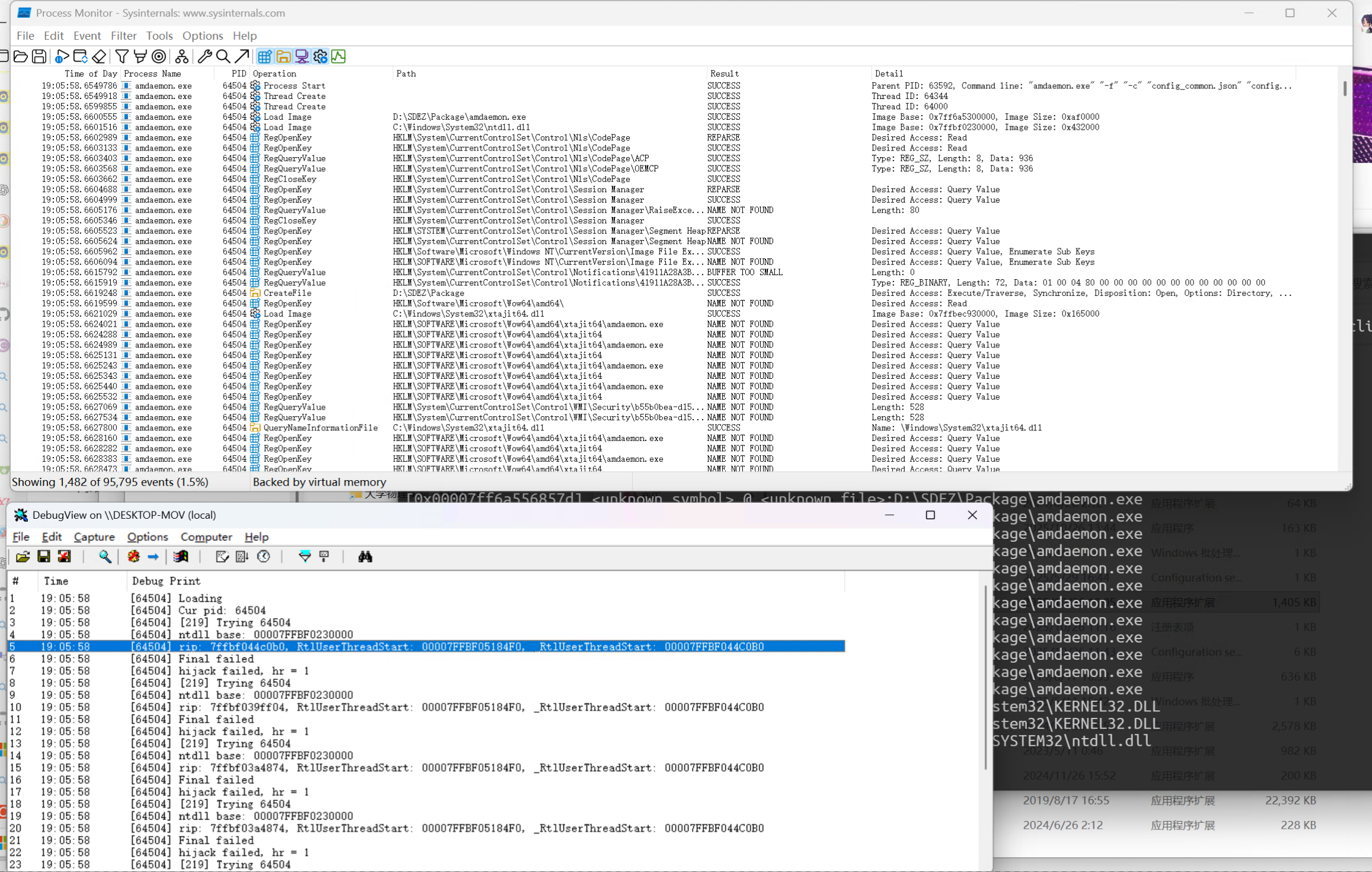
RtlUserThreadStart 是 ntdll.dll 中的函数,可以直接反编译 ntdll.dll 来逐个对比地址。64 位系统的 ntdll.dll 位于 C:\Windows\System32\ntdll.dll,不过考虑到转译层,还是使用 procmon 监控了这个进程的信息,能看到程序确实读取了这个 dll。
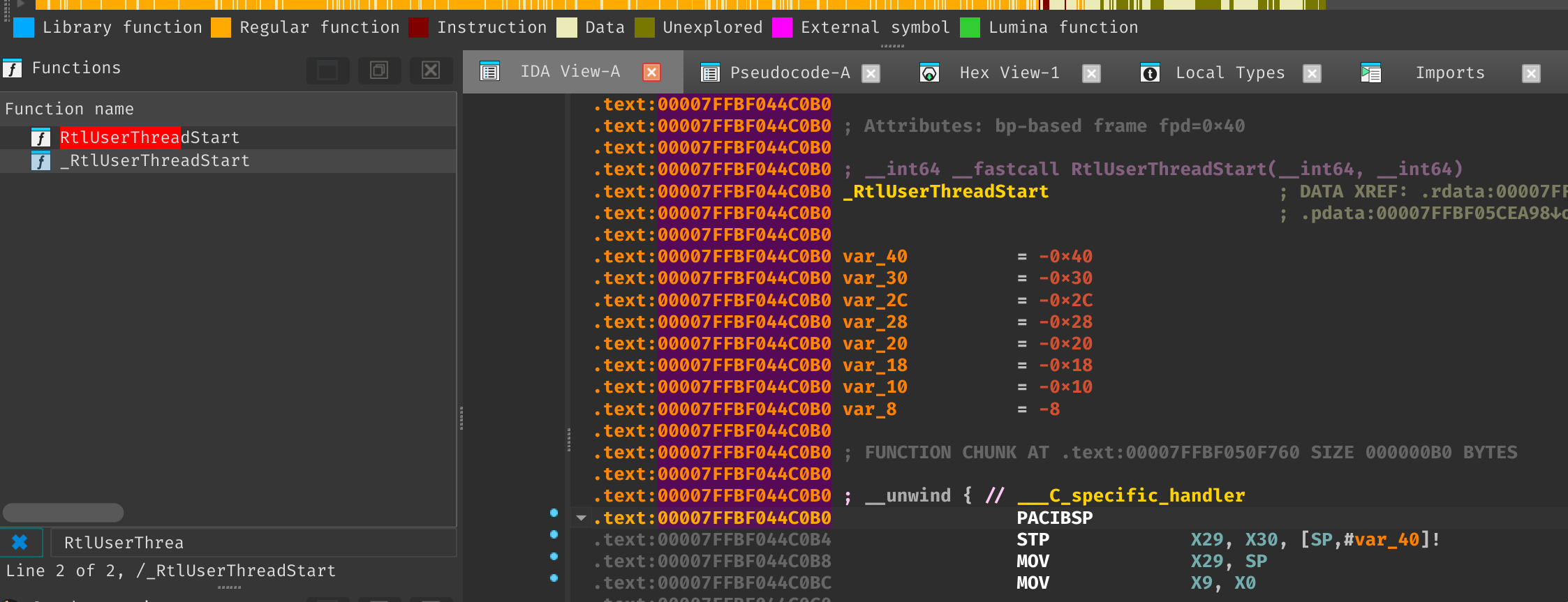
修改 capnhook,打印出 ntdll.dll 的基址,在 IDA 页面中修改基址,并且打印所有线程的 pc ,逐个 goto 打印出来的地址。前面执行流有提到,需要满足 ctx->Rip == ntstart 才可以执行 hook,打印发现 ctx->Rip 和 ntstart 都指向函数 RtlUserThreadStart ,只不过前者指向了带下划线的函数 _RtlUserThreadStart,后者指向不带下划线的 RtlUserThreadStart。
比较有意思的事情是,_RtlUserThreadStart 需要 IDA 在 64-bit ARM 模式下才能反汇编成功,而 RtlUserThreadStart 需要 metapc 64-bit,同一个二进制需要使用不同的架构打开,分别进行分析。
Windows 上 ARM 架构的混合二进制
在 Windows on Arm 下,系统二进制均被编译为 Arm64X PE 文件,也就是同一个文件,既可以被 x64 应用调用,也可以 arm64 应用调用,原理暂未深究。当模拟的 x64 程序调用 GetProcAddress(ntdll, "RtlUserThreadStart") 时,获取到的是一个跳板函数 RtlUserThreadStart:
+0x0  488bc4          mov     rax, rsp
+0x3  48895820        mov     [rax+0x20], rbx
+0x7  55              push    rbp
+0x8  5d              pop     rbp
+0x9  e9xxxxxxxx      jmp     rel32 ; +0xa = displacement */
这里的 rel32 偏移指向 _RtlUserThreadStart 。
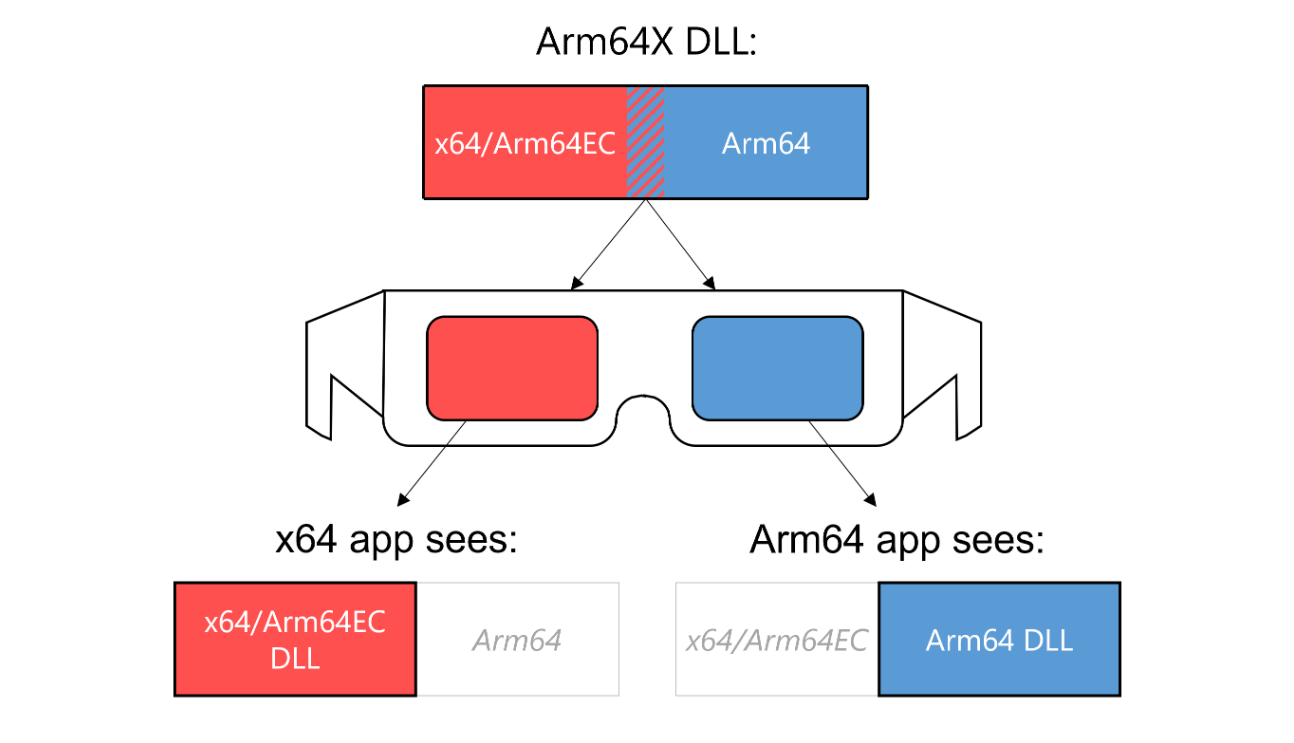
那解决方法就很简单了,将 ntstart 替换成跳转的目标地址,重新编译和覆盖 mai2hook.dll。
Patch
diff
diff --git a/hook/pe.c b/hook/pe.c
index 49b7e94..3dafff2 100644
--- a/hook/pe.c
+++ b/hook/pe.c
@@ -220,3 +220,65 @@ HRESULT pe_patch(void *dest, const void *src, size_t nbytes)

     return S_OK;
 }
+
+BOOL pe_is_arm64()
+{
+    typedef BOOL (WINAPI *LPFN_IsWow64Process2)(HANDLE, USHORT *, USHORT *);
+    LPFN_IsWow64Process2 is_wow64_process2;
+    USHORT process_machine;
+    USHORT native_machine;
+    HMODULE k32;
+    BOOL is_arm64;
+    BOOL ok;
+
+    is_arm64 = FALSE;
+    k32 = GetModuleHandleW(L"kernel32.dll");
+    if (k32 == NULL) {
+        goto end;
+    }
+
+    is_wow64_process2 =
+            (LPFN_IsWow64Process2) GetProcAddress(k32, "IsWow64Process2");
+
+    if (is_wow64_process2 == NULL) {
+        goto end;
+    }
+
+    ok = is_wow64_process2(GetCurrentProcess(),
+                           &process_machine,
+                           &native_machine);
+
+    if (!ok) {
+        goto end;
+    }
+
+    is_arm64 = native_machine == IMAGE_FILE_MACHINE_ARM64;
+end:
+    return is_arm64;
+}
+
+/* ARM64EC Fast-Forward Sequence thunks.
+   When x64 code calls GetProcAddress on an Arm64X hybrid PE, the returned
+   pointer is an x64 trampoline rather than the real ARM64EC function. Each
+   thunk is a canonical x64 prolog ending in a near JMP to the real target.
+   We read the JMP's displacement and skip past the thunk body.
+
+   Canonical prolog as of Win11 26H2 aarch64 (0xe bytes):
+       +0x0  488bc4          mov     rax, rsp
+       +0x3  48895820        mov     [rax+0x20], rbx
+       +0x7  55              push    rbp
+       +0x8  5d              pop     rbp
+       +0x9  e9xxxxxxxx      jmp     rel32 ; +0xa = displacement */
+#define X64_THUNK_JMP_DISP_OFFSET  0xa
+#define X64_THUNK_SIZE             0xe
+
+void *pe_thunk_resolve(FARPROC proc)
+{
+    INT32 offset;
+
+    assert(proc != NULL);
+
+    memcpy(&offset, (BYTE *)proc + X64_THUNK_JMP_DISP_OFFSET, sizeof(offset));
+
+    return (BYTE *)proc + X64_THUNK_SIZE + offset;
+}
diff --git a/hook/pe.h b/hook/pe.h
index 1a33f12..e56d3f0 100644
--- a/hook/pe.h
+++ b/hook/pe.h
@@ -25,3 +25,5 @@ HRESULT pe_iid_get_iat_entry(
 void *pe_get_export(HMODULE pe, const char *name, uint16_t ord);
 void *pe_get_entry_point(HMODULE pe);
 HRESULT pe_patch(void *dest, const void *src, size_t nbytes);
+BOOL pe_is_arm64();
+void *pe_thunk_resolve(FARPROC proc);
diff --git a/hook/process.c b/hook/process.c
index 7d98cf2..c87da41 100644
--- a/hook/process.c
+++ b/hook/process.c
@@ -73,6 +73,9 @@ static HRESULT process_hijack_try_thread(

     exe_entry = pe_get_entry_point(exe);
     ntstart = GetProcAddress(ntdll, "RtlUserThreadStart");
+    if (pe_is_arm64()) {
+        ntstart = pe_thunk_resolve(ntstart);
+    }

     if (ntstart == NULL) {
         /* TODO Deal with WinXP, for the poor souls still stuck on that OS.
2026–08–11 更新
PR Merge 了!
碎碎念
上一次闲来没事是折腾 Windows on Arm in Xiaomi Pad5,这一次是 Mai on Windows on Arm,我的 Arm 设备还是太多了)可能后续会研究一下 Arm64 混合二进制的加载流程,构造一些好玩的妙妙二进制。
参考:ARM64EC (and ARM64X) Explained